HOW FASTPO WORKS
From Products to Orders — One Connected Sales Flow.
FastPO gives Product Owners a shared working environment to manage products, sales policies, authorized sales users, customer access and purchase orders.
Your sales network creates the business. FastPO helps you organize, track and manage the flow.
Explore the Sales Flow Talk to Us About FastPOYou Bring the Products
FastPO Helps Your Sales Network Work.
FastPO sits between your commercial setup and the sales activities taking place in the market.
Your company defines what can be sold and under what commercial conditions.
Authorized sales users work with relevant customers and create orders.
The resulting orders return to your company for commercial processing and fulfillment.
FastPO provides the infrastructure. You own the commercial relationship.
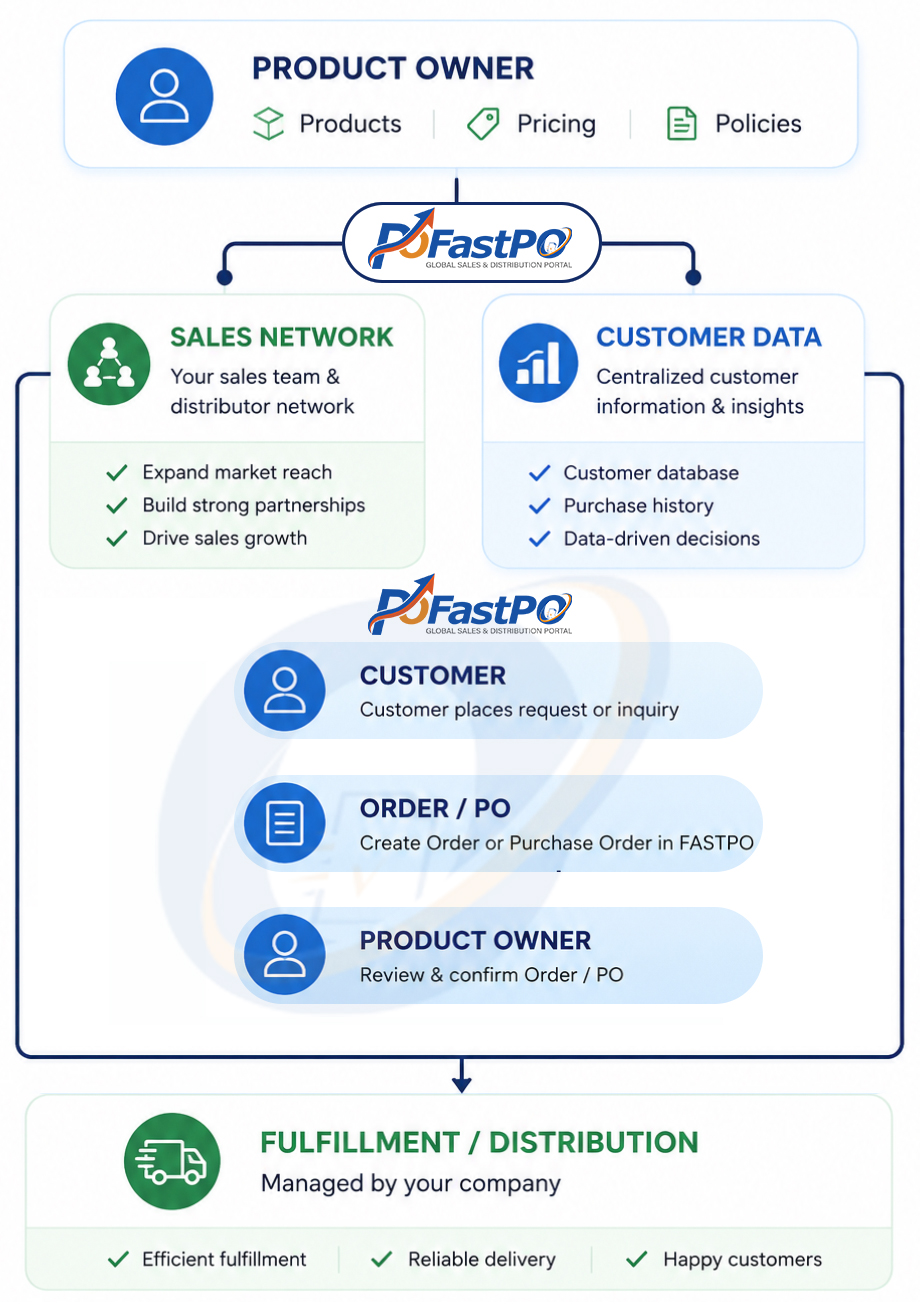
FastPO flow in steps
FastPO manages the sales-order flow — not your distribution business
Start With Your Company
Four FastPO environment begins with the Product Owner.
Your company account becomes the central place for managing the products, sales resources and commercial activities you choose to operate through FastPO.
Start small with a selected product or sales initiative, then expand as your business develops.
Key information
Company
Market
Products
Sales structure
Commercial policies
Authorized users
One company. One controlled sales environment
Define What Your Sales Network Can Sell
Add the products or product portfolio you want to make available to authorized sales users.
Depending on your business model, product information can include:
Product Name
SKU / Product Code
Description
Sales Materials
Price
Customer Discount
Sales Commission
Availability
Your company remains responsible for product information and commercial policies.
Your products. Your pricing.
Your rules.
Give the Right People the Right Access
Your sales capacity does not have to come entirely from a traditional internal sales force.
FastPO can support authorized:
Internal Sales Teams
Outsourced Sales Representatives
Independent Sales Professionals
Authorized Business Partners
Each user can be given appropriate access based on the products, customers, territories or responsibilities assigned to them.
Expand sales capacity without losing commercial visibility
Give Salespeople Somewhere Useful to Start
A salesperson without relevant customer information spends valuable time simply finding out whom to approach.
FastPO can provide authorized users with controlled access to structured customer data relevant to their sales activities.
They can search and work with customers by available criteria such as:
Customer Type • Location • Territory • Business Segment • Assigned Market
For our initial healthcare environment, customer segments may include pharmacies, clinics, healthcare companies and other relevant organizations.
Important note
Customer access can be controlled according to authorization and business rules. Sales users do not need unrestricted ownership or export access to the underlying customer database.
Use the data to sell. Keep the data controlled
Turn a Sales Conversation Into a Structured Order
Once the customer is ready to order, the authorized sales user creates the order directly in FastPO.
Select the customer.
Select the products.
Enter quantities.
Apply the appropriate commercial terms.
Review the order with the customer.
Then submit.
CUSTOMER → PRODUCT → QUANTITY → PRICE / DISCOUNT → CONFIRM → ORDER
The salesperson creates the order where the sales activity happens
Make the Order Clear to Everyone Involved
Before an order moves forward, the relevant commercial information should be visible and understandable.
FastPO provides a structured record of the order so the salesperson and customer can confirm what has been agreed.
This may include:
Products
Quantities
Pricing
Discounts
Customer Information
Sales Representative
Other Commercial Information
Once confirmed, the order can be submitted to the Product Owner.
One order. One shared understanding.
Every Order Comes Back to the Product Owner
Submitted orders become visible to the company responsible for the products.
Your authorized team can review the order and continue the appropriate commercial process.
From this point, fulfillment remains under your control.
Your company — or your appointed distributor — manages activities such as:
Order Approval
Inventory
Invoicing
Payment
Delivery
Distribution
After-Sales Service
FastPO can reflect relevant order status so authorized sales users can follow what happens next.
FastPO helps create and track the order. You decide how the order is fulfilled.
Know Where the Order Came From
When sales activity is distributed across many people, attribution matters.
FastPO connects orders with the sales users who created them and the commercial policies associated with their activities.
This provides better visibility into:
Orders Created
Sales Performance
Customer Activity
Applicable Discounts
Sales Commissions
Order Status
For the salesperson, this creates transparency.
For the Product Owner, it creates commercial visibility.
Every order leaves a trace of how value was created
Orders Become Commercial Intelligence
FastPO begins as a practical sales tool.
But as more sales activities and orders pass through the system, the Product Owner begins to see patterns that individual conversations or spreadsheets may not reveal.
Which products are generating interest?
Which customers are ordering?
Which territories are becoming active?
Which sales resources are producing results?
Which commercial policies are working?
Where should the company invest next?

FastPO Helps You
Manage products
Organize sales access
Work with customer data
Create orders
Confirm order information
Track order status
Attribute sales activity
Track commissions
Your Company Manages
Product ownership
Commercial decisions
Distributor relationships
Inventory
Invoicing
Payments
Fulfillment
Delivery
Regulatory responsibilities.
Start With Your Products and Your Sales Model
You do not need to build a large sales organization before using FastPO. Start with a product. Start with a few authorized sales users. Start with the customers you want to reach. Then let the system grow with your commercial activity.